


Starri - Move to music
3.641.00 Reviews
App Specs
- Version
- 2025.04.19
- Updated On
- License
- Free
- Downloads
- 50,000+
- Developer
- Nex Team Inc.
- Categories
- Music
- Platform
- Android
Screenshots

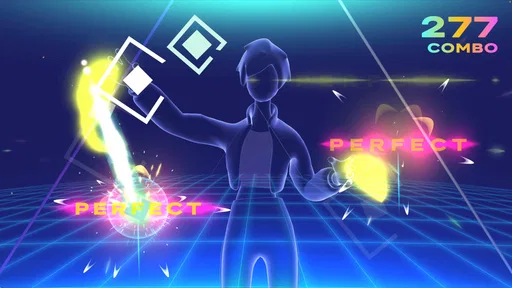
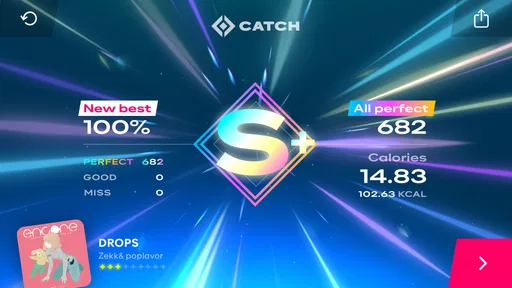


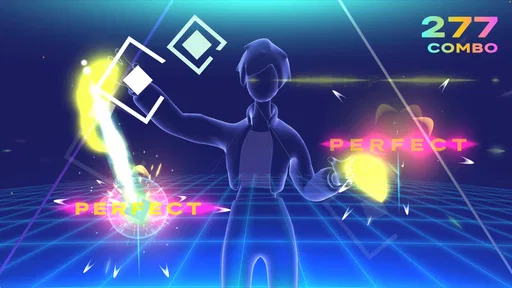
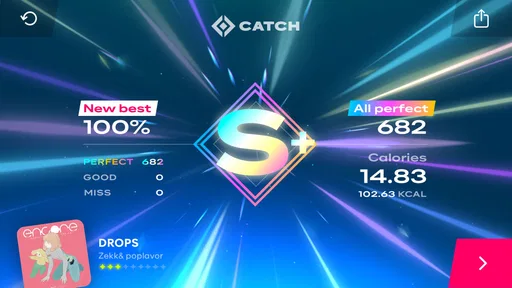

 Analysis by AppCompare
If you are trying Starri - Move to Music for the first time, the best way to approach it is as a motion-based music game, not as a replacement for a dance class or a workout plan. Its appeal is the simple idea of moving along with music and getting a playable activity out of the space you already have at home. I like that low-pressure starting point: you do not need to arrive with choreography memorized, just enough room to move and a willingness to try.
What the first session is really for
Starri is a music game from Nex Team Inc., and its central attraction is turning movement into part of play. That makes it a different proposition from a music player, where the song is the whole experience, or a dance tutorial, where learning a sequence is the main goal. Here, the first useful test is whether you enjoy following the game’s movement prompts and responding to music. If that feels satisfying, the rest of the experience has a reason to matter; if you mainly want to listen, a regular music app is the simpler choice.
The game is free to install, though it includes in-app purchases ranging from $0.99 to $47.99 per item. I would treat those as optional spending rather than something to decide on before trying the basic experience. The content rating is Everyone, and the game is aimed at a broad audience, but a parent should still consider whether a child has enough clear space to move safely and whether the device will be used under supervision.
Make the room and phone work for you
Before starting, choose a place where you can move without worrying about furniture, pets, cables, or anything breakable. A modest clear area is more useful than a large room with clutter in the way. Put the phone where it can see you, keep it stable, and check that your full movement area is visible. Since this kind of play depends on the camera’s view, a small adjustment to the phone’s position can make a session feel less frustrating than repeatedly trying to compensate with your movements.
Wear clothes that let you move comfortably and choose a level of effort that suits the moment. You do not have to turn a quick game into an intense workout. A short session after sitting at a desk, a playful break while waiting for dinner, or a few songs with a friend can all be worthwhile ways to use it. If you live with other people, think about where you can move without blocking a walkway; the space that works best is the one you can use safely and repeatably.
Getting to that first satisfying round
On your first try, focus on following the rhythm rather than chasing a perfect score or trying to make every movement look impressive. Give yourself a moment to learn how the game responds, and use a less demanding routine if you are still getting comfortable. The first meaningful success is not necessarily finishing at the top of a leaderboard; it is completing a round and feeling that your movement and the music have started to come together.
If the tracking feels off, do not immediately assume you are doing the routine wrong. Check the camera’s view, lighting, and available space, then try again with movements that stay clearly inside the visible area. This is a practical trade-off with camera-driven play: it can make a phone feel interactive without extra equipment, but it also depends on the room and the phone being positioned sensibly. A stable setup saves more effort than attempting to move faster or farther.
Worth Reading Before You Choose

Flipboard Shows What News Apps Must Do Beyond the Feed

Switching to Android Auto Means Rethinking Your Driving Routine

Google Calendar Makes a Crowded Week Easier to Manage

Ludo King Makes the Most of the Minutes Between Plans

Baby Panda World Brings Quick Play to Modern Phones, but Its Game Library Feels Busy

ESPN’s Live Game View Makes Following Close Games Easier
How it fits alongside other music and movement apps
Compared with rhythm games built around tapping a screen, Starri asks you to involve more of your body, so it can feel more active and less like a game played with your thumbs. Compared with a dance lesson, it is better suited to spontaneous play than to carefully building technique. And compared with a standard fitness app, its music-game framing may make movement feel more inviting, though it is not the option I would choose when I need a structured training plan or precise exercise guidance.
That distinction helps set expectations. Someone who wants a casual way to move to music at home may find a useful middle ground here: more physical than tapping through a track, but less formal than practicing choreography. Someone who needs quiet, has very little room, or prefers a seated game should look elsewhere. The camera-based format also makes it a poor fit when you cannot comfortably set the phone down with a clear view of your movement.
Choosing when to play and what to value
A realistic use is a brief after-work reset: move a chair out of the way, place the phone securely, choose a routine that feels manageable, and play until you have had enough. That can break up an evening of sitting without requiring you to change clothes or commit to a long workout. Another good use is a casual turn-taking session with a friend or family member, where the point is to laugh and try the moves rather than compare abilities seriously.
For a more satisfying repeat session, pay attention to what made the first one work. Was the phone easy to see from your position? Did the chosen pace feel comfortable? Did you enjoy following the movement, or were you mostly distracted by the score? Adjust one thing at a time next session. This gives you a clearer sense of whether the game suits you, instead of spending money or changing several parts of the setup before you know what you like.
The game has an average rating of 3.6 from 762 ratings, alongside 41 written reviews, and has passed 50K installs. Those figures suggest a real audience, but they are not a promise that the camera setup or style of play will suit every home. It was released on September 1, 2022, and its current version is 2025.04.19, with Android 11 as the minimum operating-system requirement. If your device is older than that, check compatibility before planning a session.
As you get used to it, decide whether you want a quick burst of activity, a score to improve, or simply a playful way to enjoy music. Those are different goals, and they do not all call for the same routine or level of effort. I would avoid treating a game score as a measure of fitness or dance ability; it is more useful as feedback within the game than as a verdict on how well you move.
Ever find yourself tapping your feet to the beat of your favorite song? Or feeling that irresistible urge to dance when no one's watching? Well, folks, it’s time to channel that energy into something fun and engaging with Starri - Move to Music. This app takes your love for music and turns it into a full-body experience. Let’s dive into what makes this app a must-try for music and dance lovers alike.
Getting into the Groove
First things first, let’s talk about how easy it is to get started with Starri. Downloading the app is a breeze, whether you're on Android or iOS. Once installed, the app greets you with a colorful and intuitive interface. The setup process is straightforward, and before you know it, you’re ready to dance like no one’s watching (or maybe like everyone is watching, because you’ll look that good!).
The Beat of Your Own Drum
The magic of Starri lies in its ability to sync your movements with the music. The app offers a wide variety of tracks, from pop hits to classical pieces, ensuring there’s something for everyone. What’s really cool is the motion detection feature that uses your phone's camera to track your movements. This turns your living room into a dance floor and you into the star of the show.
And hey, no need to worry if you’ve got two left feet. The app provides step-by-step tutorials that guide you through each move. It’s like having a personal dance instructor right in your pocket.
Dance, Compete, Repeat
One of the standout features is the competitive aspect. You can challenge friends or join global leaderboards to see how your moves stack up against dancers worldwide. It’s the perfect blend of fun and friendly competition. Plus, the sense of achievement when you climb up the ranks is seriously rewarding.
The app also includes various dance routines, categorized by difficulty levels. Whether you're a beginner or a seasoned dancer, there’s a challenge waiting for you. And trust me, nothing beats the feeling of nailing a routine you’ve been practicing.
Customization and Personalization
Starri does a great job of letting you personalize your experience. You can create playlists of your favorite songs or even upload your own tracks to dance to. The app also allows you to customize your avatar, adding a fun layer of personalization. It’s all about making your dance journey uniquely yours.
Community and Connectivity
A huge plus is the app’s community feature. You can connect with other users, share tips, or even collaborate on dance routines. It’s a vibrant and supportive community that encourages creativity and improvement. Plus, for those looking to showcase their skills, the app offers an option to share your performances on social media directly from the app.
Keeping Fit with Fun
Let’s not forget the health benefits. Dancing is a fantastic way to keep fit, and with Starri, you’re getting a workout without it feeling like one. The app tracks your movements and provides feedback on your performance, making it easy to monitor your progress and stay motivated.
It’s like having a gym session, but way more enjoyable because you’re moving to the music you love. And in these times, staying active and healthy is more important than ever.
Final Thoughts
All in all, Starri is an app that strikes the perfect balance between fun, fitness, and functionality. Whether you’re looking to improve your dance skills, compete with friends, or simply have a good time, this app has got you covered. It’s a delightful way to break a sweat and let loose, all while enjoying your favorite tunes.
So, what are you waiting for? Grab your phone, download the app, and start dancing your heart out. Trust me, once you start, you won’t want to stop!
Pros
- Engaging gameplay that keeps you active
- Wide variety of music genres available
- Intuitive controls for seamless play
- Visually appealing and colorful interface
- Regular updates with new content
Cons
- Requires constant internet connection
- Limited free content without subscription
- Some songs may not sync perfectly
- Occasional ads interrupt gameplay
- Battery consumption is relatively high
FAQs for Starri - Move to music
What is the main objective of Starri - Move to music?
Starri - Move to music is designed to combine physical activity with rhythmic gameplay. The objective is to keep players engaged by moving to the beat of the music, providing a fun way to exercise while enjoying a wide variety of songs. The app aims to motivate users to stay active through dance and movement challenges.
What kind of music genres are available in Starri?
Starri offers a diverse range of music genres to cater to different musical tastes. Users can expect to find pop, hip-hop, electronic, and even classical tracks. The variety ensures that players of all ages and preferences can find something enjoyable to groove to, enhancing the overall experience.
Are there any in-app purchases or advertisements?
Yes, Starri includes in-app purchases and advertisements. While the app is free to download and play, certain premium features and exclusive tracks may require purchase. Advertisements may appear occasionally, but they can often be removed through a paid upgrade for an uninterrupted experience.
Is Starri suitable for all age groups?
Starri is designed to be family-friendly, making it suitable for users of all ages. The app includes songs and challenges that are appropriate for children, teenagers, and adults alike. Parents can feel comfortable allowing their kids to play, knowing the content is safe and engaging for younger audiences.
Does Starri require an internet connection to play?
Starri typically needs an internet connection to download new songs and updates, but once the music is downloaded, users can enjoy offline gameplay. This feature is particularly useful for those who want to play while on the go or in areas with limited internet access.


